
When generating speech with text-to-speech (TTS) tools, you may sometimes notice that certain words are mispronounced or incorrectly stressed. This can affect clarity, tone, and even meaning. To solve this, TTSMaker supports the <phoneme> tag, which allows you to define precise IPA (International Phonetic Alphabet) pronunciations for any word in any language.
With IPA customization, you can correct default pronunciations, insert foreign-language words, or fine-tune how names and technical terms are spoken.
English Example: Different Pronunciations of “tomato”
In English, the word "tomato" has different pronunciations in American and British accents. Here’s how you can use the <phoneme> tag to specify each:
American English:
<phoneme alphabet="ipa" ph="tə.ˈmeɪ.toʊ">tomato</phoneme>British English:
<phoneme alphabet="ipa" ph="tə.ˈmɑː.təʊ">tomato</phoneme>This ensures the system speaks “tomato” exactly the way you intend, without relying on the voice model’s automatic guess.
Spanish Example: Same Spelling, Different Meaning
Some words have multiple valid pronunciations depending on grammar or stress. A good example is the Spanish word “esta”, which can either be a demonstrative adjective or a verb form:
<phoneme alphabet="ipa" ph="ˈes.ta">esta</phoneme>   <!-- Demonstrative: "this" -->
<phoneme alphabet="ipa" ph="es.ˈta">está</phoneme>   <!-- Verb: "is" -->
Without IPA tags, the system may guess incorrectly. By using <phoneme>, you can directly control stress and avoid misinterpretation.
Multilingual Example: Foreign Word in an English Sentence
One of the greatest advantages of IPA is that it’s language-agnostic — it works across languages. You can insert a foreign-language word into an English sentence, and have it pronounced correctly:
The local guide smiled and said <phoneme alphabet="ipa" ph="ˈkiːtos">kiitos</phoneme> for our support.In this example, the main narration uses an English voice, but the Finnish word "kiitos" ("thank you") is correctly pronounced using IPA, even though it's from a different language.
Why Use IPA?
IPA (International Phonetic Alphabet) is a global standard used in linguistics, education, and speech synthesis. It offers powerful advantages:
- Precisely control stress, syllables, and pronunciation
- Fix mispronunciations of names, acronyms, and rare words
- Insert native-sounding foreign words into a sentence
- Teach correct pronunciation in language-learning contexts
- Make your generated voice sound smoother and more natural
Common Use Cases
- Correct misread names (e.g. Qatar, Elon Musk, Louis Vuitton)
- Resolve homographs like “lead” (/liːd/ vs. /lɛd/)
- Localize marketing and narration scripts with multilingual elements
- Teach accurate pronunciation in e-learning and language apps
- Control tone and rhythm for voiceovers or audiobooks
How to Use the <phoneme> Tag in TTSMaker
Below is an example of how to use the <phoneme> tag in your input:
<phoneme alphabet="ipa" ph="tə.ˈmeɪ.toʊ">tomato</phoneme>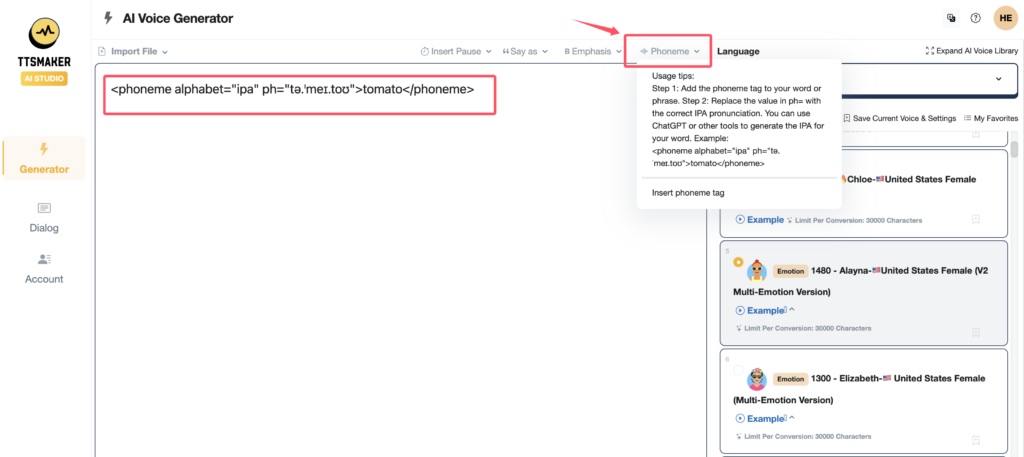
The tag will override the default pronunciation and speak the text exactly as defined by the IPA string.
Does My Voice Support IPA?
Most voice models in TTSMaker support IPA pronunciation via the <phoneme> tag.
-
✅ If the voice supports IPA, the "Phoneme" button will appear in the input panel.
-
❌ If the voice does not support IPA, the "Phoneme" button will not be shown, and IPA tags will be ignored.
We recommend using voices that show the phoneme feature to take full advantage of pronunciation control.
If you're not sure how to generate an IPA transcription, you can use tools like ChatGPT, IPA dictionaries, or other AI services to convert words into IPA format.
For further assistance, examples, or advanced usage tips, feel free to contact our support team.
TTSMaker is here to help you create more natural, clear, and professional voice output with our powerful AI voice generator.